

2.4 Inch Raspberry Pi Touch Screen SPI Interface TFT LCD 320×240 Pixel Display LED Backlight for Raspberry Pi 4B 3B+ Zero 2 W
- Fast delivery
- 30-day returns
Product details
| Brand Name | Caturda |
|---|
2.4 Inch Raspberry Pi Touch Screen SPI Interface TFT LCD 320×240 Pixel Display LED Backlight for Raspberry Pi 4B 3B+ Zero 2 W
Features:
*2.4inch standard display with physical resolution of 320×240
*SPI interface with resistive touch screen for touch control
*Perfectly compatible and can be directly inserted into any version of the Raspberry Pi (Raspberry Pi ZeroW, A, A+, B, B+, 2B, 3B, 3B+)
*Support for Raspbian/Ubuntu/Kali systems, Provide driver, image, and online wiki guidance documents
*This product has passed CE and RoHS certification
Parameters:
Screen Size:2.4inch
LCD Type :TFT
Module Interface:SPI
Resolution:320*240 (Pixel)
Active Area:36.72x48.96(mm)
Touch Screen Controller:XPT2046
LCD Driver IC:ILI9341
Backlight:LED
Power Consumption:0.08A*5V
Operating Temperature(℃):-20~60
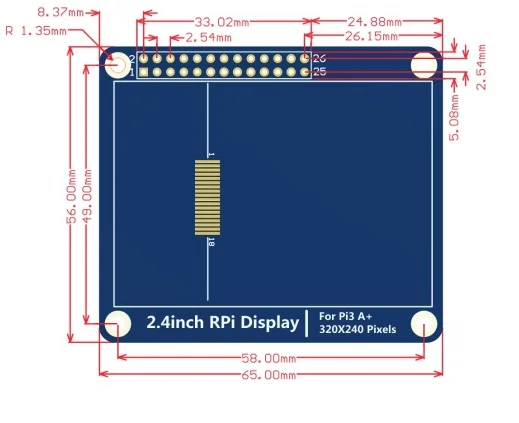
Module PCB Size:56.00x65.00(mm)
Rough Weight(Package containing)(g):37 (g)
How to use with Raspberry Pi OS:
Step 1, Install official image Raspberry Pi OS
1) Download the latest image from the official download
https://www.raspberrypi.com/software/operating-systems/
2) Install the system according to the official tutorial steps.
Step 2, Install the driver for the LCD
1) Connect the 2.4inch RPi Display For RPi 3A+ with the Raspberry Pi and plug it in
2) Log into the command line interface for Raspberry Pi(Initial user name: pi, Password: raspberry), Get the latest drive from GitHub (the raspberry pie needs to connect to the Internet), Execute the following commands:
sudo rm -rf LCD-show
git clone https://github.com/goodtft/LCD-show.gitchmod -R 755 LCD-show
cd LCD-show/
sudo ./LCD24-3A+-show
After execution, the system will be restarted. If the display and touch are normal, the installation is successful.
Reference link:
http://www.lcdwiki.com/2.4inch_RPi_Display_For_RPi_3A+
Interface Definition:

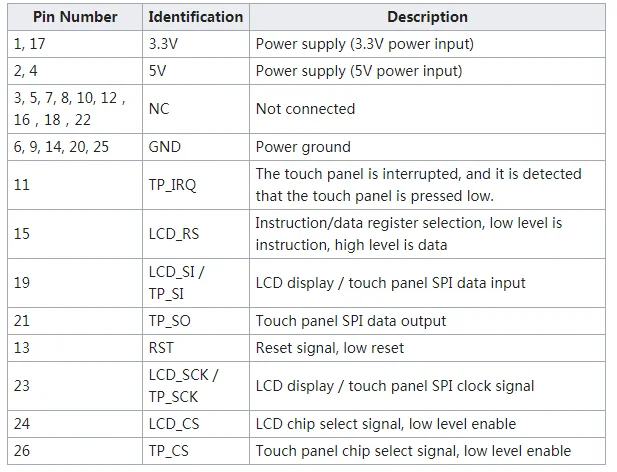
Product Size:
Package List:
1 × 2.4inch Touch Screen
(Don't include the Raspberry Pi Board)


| Category | Tech & Electronics › Peripherals & Accessories › Laptop Accessories |
|---|---|
| Availability | In stock |
| Ships to | Canada |
| Buyer Guarantees | 15-Day No Update Refund & 60-Day No Delivery Refund |
No reviews yet
Be the first to share what you think of this product.


