

604 604XL Refillable Ink Cartridge With Chip For Epson XP-2200 XP-2205 XP-3200 XP-3205 XP-4200 XP-4205 WF-2910 WF 2930 2935 2950
- Fast delivery
- 30-day returns

604 604xl Refillable Ink Cartridge With Disposable Chip For Epson XP-2200 XP-2205 XP-3200 XP-3205 XP-4200 XP-4205 WF-2910 WF-2930 WF-2935 WF-2950 Printers
Products: Empty refill ink cartridge with disposable chip
Printer model: For Epson XP-2200/XP-2205/ XP-3200/XP-3205 / XP-4200/XP-4205
WF-2910DWF /WF-2930DWF /WF-2935DWF /WF-2950DWF Printers
Cartridge Code: 604XL 604
Noted. Please check the printer cartridge number before ordering. It is important to ensure that the cartridge number matches the printer model. If you have any doubts or questions, feel free to ask for assistance.
Chip: Disposable chip/One time chip/ Single use chip(When the chip finished,you need change
the chip )
Package 1: 1set refillable ink cartridge wiht chip


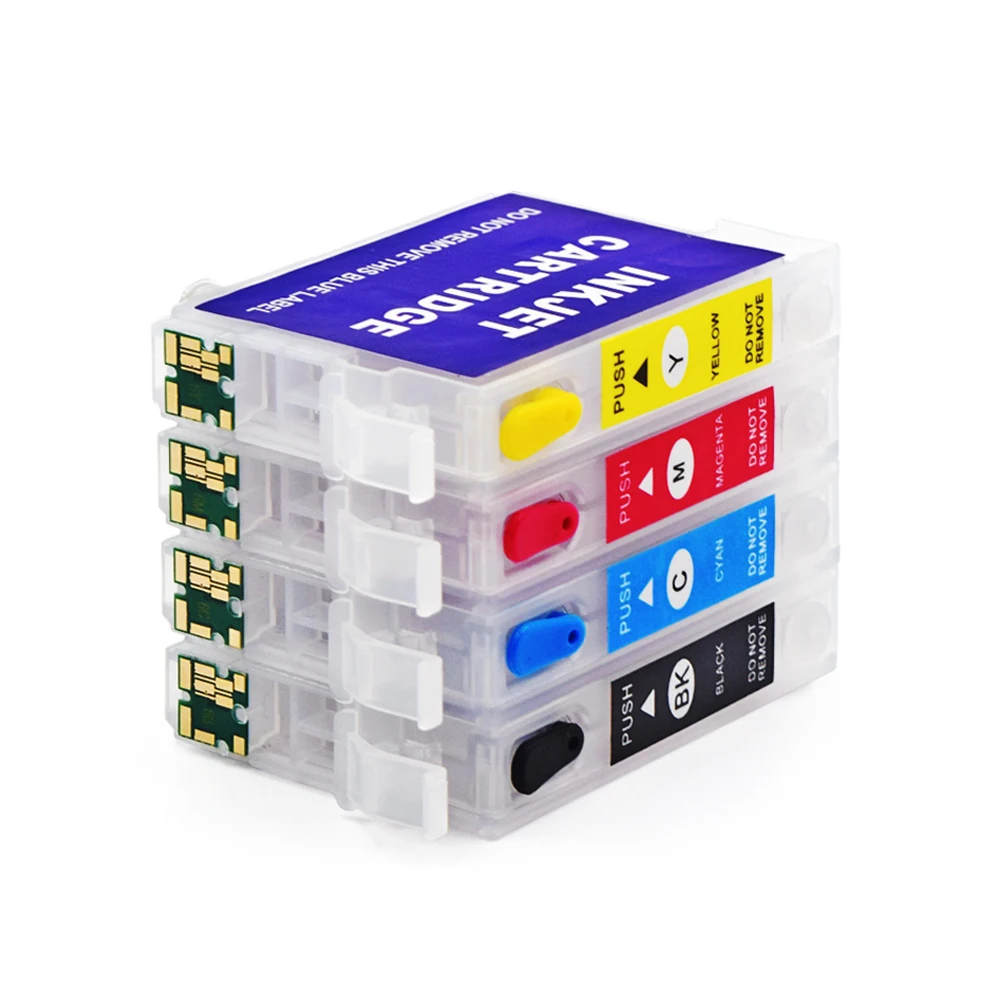

Attention: When adding ink, please place the syringe vertically downwards to avoid the needle piercing the film on the side wall of the ink cartridge. Please refill ink from ink hole, When you print,Remove the plug from the air hole
Related products, if you are interested, you can click on the image below


Refillable Cartridge Instructions for Ep printers


1. Recommendations
1.1 Before replacing your original Epson cartridges with the Refillable Cartridges, it is important to confirm that your printer is working correctly
1.2 When you do not use your printer for a long time, always perform a nozzle check prior to use. Install the original ink cartridge and print a test page to check if the nozzle is working properly
2. Installation
2.1 *** VERY IMPORTANT *** Note where the air hole is located and remove the plug from the air hole.
2.2 Note where the ink hole is located and remove the plug from the ink hole.
2.3 *** CRITICAL *** Sharp needles which can cause damage to the delicate cartridge wall membranes if you are not attentive. It is therefore VERY IMPORTANT to insert the needle straight down to avoid damage to the cartridge walls.
2.4 Using the method described above, inject ink into the cartridge through the ink hole. Inject slowly to avoid the formation of air bubbles. When sucking ink from the bottle into the syringe, put the needle in deep to avoid sucking any air bubbles into the syringe. Inject about
8-10ml of ink or until almost at the top. Please DO NOT inject any ink into the air vent hole.
2.5 Reseal the fill ink hole with its plug. The cartridge is now ready to be inserted into the printer. Please DO NOT remove the clear plastic membrane from the exit port on the bottom of the cartridge. The printer will puncture this membrane upon installation. REPEAT steps 2.1 to 2.5 for all the cartridges in your refilling system. Be sure to use a different clean syringe and needle when switching between colors.
2.6 Remove the original cartridges from the printer.We recommend not discarding your Epson-brand cartridges, for future reference.
2.7 Install the refillable cartridges. Let the cartridge sit in the correct slot,and then once seated, apply pressure down and forwards until it clicks into place. As mentioned previously, the full set of cartridges should be installed to guarantee proper functionality.
2.8 Upon installation, the printer may warn you that the cartridges you just installed are not genuine Epson cartridges. Follow the onscreen instructions to accept the use of the refillable cartridges.
3. Priming the Printer with the Refillable Cartridge
3.1 Perform a nozzle check and print head cleanings, as required. Several print head cleanings may be required to pump all the air out of the system.
4. Troubleshooting
4.1 Printer does not recognize or accept the cartridge
Try removing and reinstalling the cartridge
Make sure that a good contact is made between the printer and the chip on the cartridge.
Make sure that the unrecognized cartridge is well plugged in. You may need to remove it and put it back or wiggle it to ensure it is sitting well in the printer. You can also clean the chip contacts with a damp paper towel if you suspect they may be dirty.
4.2 Poor print quality (horizontal lines on printouts)
Perform a cleaning cycle, followed by a nozzle check.
If the nozzle check is not perfect at this point, perform additional
cleaning cycles and try again.If after 3 cleaning cycles, the nozzle check is not perfect, wait
12-24 hours before performing additional cleanings.If you continue to see no improvement, contact us for support.
There are several advantages to refilling ink cartridges:
1. Cost savings: Refilling ink cartridges is generally more cost-effective than buying new Original ink cartridge.
2. Environmentally friendly: Refilling ink cartridges reduces the amount of plastic waste generated from disposable cartridges.
3. Convenience: Refilling ink cartridges can be done at home refill, making it more convenient than having to purchase new cartridges.
4. Customization: Refilling ink cartridges allows for customization of ink color and quality, such as dye ink, pigment ink, or sublimation ink.

2.Our price not include duty and express remote areas fee for Express
3. If there any damage while receive package, please take video before open it .
4.Any question for product information ,contact our customer service for free .
5.If you think that you are not prepared to buy this product now,you can add to cart or favorites
Shipping Method | Estimated Shipping Time | Notes |
AliExpress Standard Shipping | 10-45 days | Affordable and safety |
DHL, Fedex,UPS | 5-10 days | Faster and reliability |
Cainiao Super Economy Global | 10-60 days | Faster but more slower |
Sea Freight | 30-45 days | Cheaper but longer |
Please note that the above time limits are for reference only and may be affected by various factors, such as customs clearance and holidays

Thank you for choosing our products! If you are satisfied with your purchase, we would greatly
appreciate it if you could leave us a review below and let others know about your experience.
Looking forward to your five-star review

| Category | Computer & Office › Office Supplies › Office Electronics |
|---|---|
| Availability | In stock |
| Ships to | Canada |
| Buyer Guarantees | 15-Day No Update Refund & 60-Day No Delivery Refund |
No reviews yet
Be the first to share what you think of this product.


